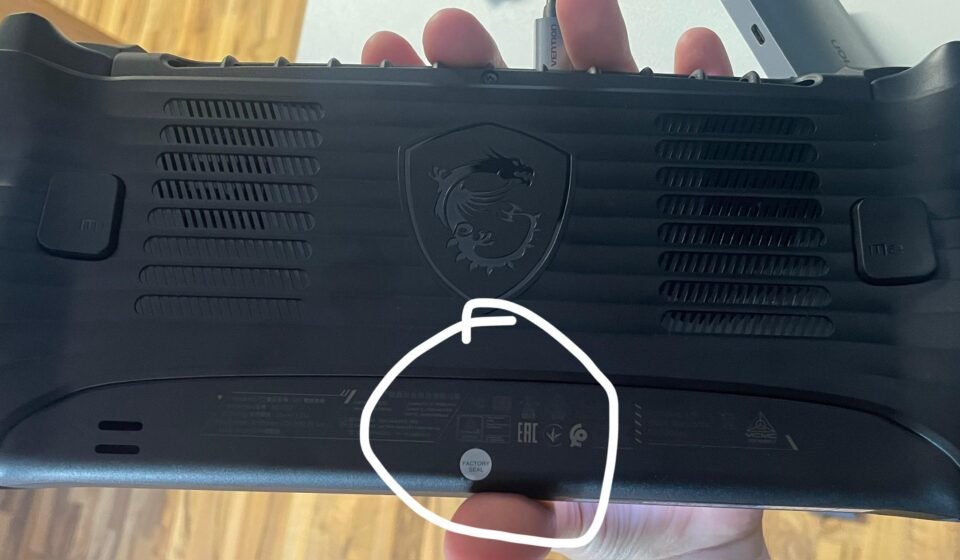

Basically, the MSI factory seal is a tamper-evident sticker. It is placed over a case screw on various components and laptops. The main purpose of the MSI factory seal is to verify that the product is not opened before it reaches the customer. It shows the authenticity of the product, showing that no alteration was made when the product leaves the factory and reaches the customer.
For many people, it becomes a topic of confusion. Sometimes when gamers want to upgrade the RAM of an MSI laptop, they hesitate to break the seal because they fear that if they break it, then they will void their hardware warranty.
What is the real meaning of a factory seal?
So you should know what the MSI factory seal actually means. Basically, a factory seal is placed on the bottom chassis that confirms that the laptop has passed the quality control standard at the manufacturing unit.
Breaking the seal doesn’t directly imply voiding the warranty. According to the manufacturer, PC users are required to perform routine maintenance like dusting the internal fans; therefore, opening the laptop to add a second storage or memory drive is permitted.
Open at your own risk policy!
However, at the same time, you should focus on the policy ‘open at your own risk’; for example, if you open your laptop and a component accidentally cracks or liquid spills inside, then your warranty will be voided. In this case, the broken seal proves that the laptop was opened by the user, which means you become liable for the damage that occurred. So, it is better not to open it.
Upgrading VS warranty limitations!
Without voiding the warranty, you can upgrade storage. However, the problem arises if you try to alter its components. For example: dismantling the cooling assembly or applying thermal paste to the CPU or GPU. If you visit the service centre and they detect that you have tampered with the heat sink, which damaged the internal parts during an upgrade, then you won’t be able to make your warranty claim successful.
Variations of policy according to the region!
Since MSI operates across the world, the official policies can vary slightly depending on the area. The local consumer laws may also vary in various areas, like the United States and Canada, where consumer organizations protect users when they repair and upgrade their electronics without losing warranty coverage. On the other hand, some international distributors consider sticker interpretation for warranty seals.
If you are planning to upgrade your system, then first of all, you should directly contact MSI support regarding the seal breakage.
What should you do when upgrading your system?
If you have to break the factory seal, then you should follow these tips to protect your warranty.
- Keep the seal photographed.
Take precise and high-resolution photos of the intact seal before you break it.
- Contact the support team
Contact the MSI support team to confirm your regional policy.
- Handle all your components carefully.
When working inside the chassis, you should use an anti-static wristband to avoid touching sensitive circuits or components.
- Keep the original parts.
Be sure you store the factory-provided memory and RAM safely.
Bottom line!
In the end, be careful and knowledgeable about the internal components to boost the performance of your system. It keeps your hardware warranty intact.